How Othermile checks an order before it ships
Every order can go out by more than one route, each with its own cost, border charge and delivery time. What Othermile looks at, how your limits decide, and what happens when an order needs you.
By the Othermile team
Every order your store receives can go out by more than one route: your printer's usual facility, a backup printer, mail or courier. Each route has a different cost, a different border charge and a different delivery time. Othermile looks at all of them for every order, before anything is printed or shipped, and does what your rules say.
1. The order arrives
Othermile connects to where your orders come from, such as Shopify, WooCommerce, BigCommerce, Printify and Printful. A new order is checked as soon as it arrives. Customer names and street addresses are not kept.
2. Every route is priced
For each way the order could ship, Othermile works out what you pay (products, shipping and any border charges you prepay), what your customer may pay at the door, and what you keep. The products come from your own product list, with their tariff codes and origins.
3. Your limits decide
You set your limits once, for example: never let a customer pay more than C$15 at the door, and never let a margin drop below 30%. Each order then gets one of four outcomes:
- Released: inside your limits, so it goes ahead on its own.
- Switched: a better route is inside your limits, so it uses that one.
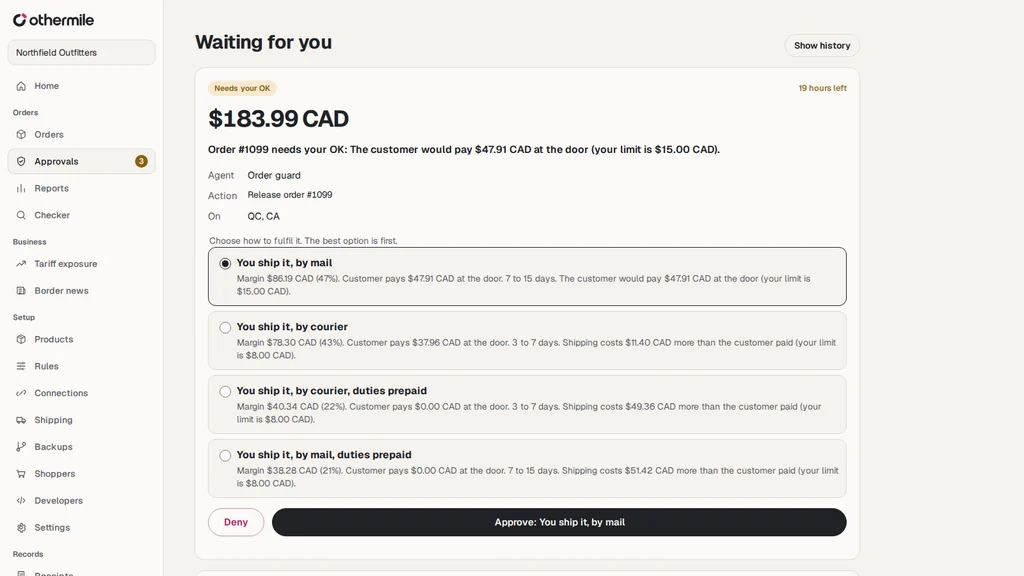
- Held: it needs you, so it waits and your phone shows every option side by side.
- Blocked: it cannot go, for example because the product is banned at the border.
4. You approve on your phone
A held order reaches your phone with each option priced. You choose one and confirm with Face ID, a fingerprint or your device lock. The approval covers only that choice.
5. A record of every decision
Each decision is kept in a signed record with what was known at the time, so you can show later why an order went the way it did.
Try it on your own parcel
What would this parcel owe at the border?
Change the product, where it was made, the price or how it ships, then check. Free, with no account.
Your estimate appears here.
Pick a product and price, then check.
Othermile checks every order like this before it ships, and holds the costly ones for your OK. Start free
Try it on your own store
Othermile has a free plan. Create your account, connect a store, and your next order is checked before it ships. The integrations page lists everything that connects today.
This guide explains public rules in plain language for general information. It is not customs, tax or legal advice; the exact tariff code, your paperwork and the carrier decide the final amount.
Selling on Shopify?
Othermile for Shopify
Check every Shopify order for Canada and US duties, tariffs and fees before it ships, hold the costly ones in Shopify, and show shoppers the cost at checkout.
Selling on WooCommerce?
Othermile for WooCommerce
A free plugin that checks every WooCommerce order for Canada and US duties, tariffs and fees, puts costly ones On hold, and shows shoppers the cost.
See what your own orders cost at the border
Start freeOr price a parcel above, or get an email when the rules change
Border news by email
One short email on Tuesdays with the week's changes to duties, tariffs and bans between Canada and the US, and our new guides. Free, and every email has a link to stop.
Keep reading

Black Friday at Othermile: 50% off any paid plan for 3 months
Until Monday, November 30, every paid Othermile plan is half price for your first 3 months, taken off at checkout with no code. Seller is $9.50 a month.

How to read your free border cost audit, and what to change first
Read the audit top down: the total, the orders that owed something, the heavy ones, products and regions, and the three changes worth trying first.

Othermile is on the Shopify App Store: duties and border checks for every order
Install Othermile from the Shopify App Store to check every order for Canada and US duties, tariffs and fees, and hold the costly ones in Shopify.